Changing the Editor for the --edit Flag
Question
Is there a way to change which editor opens when I use the --edit flag while creating a migration?
Is there a way to change which editor opens when I use the --edit flag while creating a migration?
My revisions table lists the following versions:
mysql> SELECT * FROM  "atlas_schema_revisions";
+-------------------------+---------+-----+
| version                 | applied | ... |
+-------------------------+---------+-----+
| .atlas_cloud_identifier | 0       |     |
| 20251007053111          | 1       |     |
| 20251007051222          | 1       |     |
| 20250618084333          | 1       |     |
+-------------------------+---------+-----+
However, when I inspect the target database, the schema changes from 20250618084333 were never applied. How can I delete the latest row(s) so the revision history reflects the actual state?
How can I keep a single canonical schema or model and apply it to multiple database drivers (for example, an application Postgres database and a data-lake store) so the two remain in sync?
Given a large database schema, how can I manage schema migration for a single table without affecting the rest of the schema?
Atlas supports the --include flag (or the env.include attribute) to scope operations to specific resources.
If you need to manage the lifecycle of a single table (or a set of tables), use this flag to avoid changes to the rest
of the schema.
For example, to manage the products table in a MySQL database:
atlas schema apply \
  --url "mysql://root:pass@:3308/db" \
  --to "file://schema.sql" \
  --dev-url "docker://mysql/8/dev" \
  --include "products"
If the connection URL is not bound to a schema, specify the schema name in the pattern:
atlas schema apply \
  --url "mysql://root:pass@:3308/" \
  --to "file://schema.sql" \
  --dev-url "docker://mysql/8" \
  --include "db.products"
This command will only apply changes related to the products table, leaving other tables untouched.
If the table exists in multiple schemas (tenants), you can use wildcards to include it across all schemas. For example:
atlas schema apply \
  --url "mysql://root:pass@:3308/" \
  --to "file://schema.sql" \
  --dev-url "docker://mysql/8" \
  --include "*.products"
Read more:
How to inspect an external_schema data source (ORM schema) in atlas.hcl to confirm it loaded correctly?
Why does Atlas not detect PostgreSQL event_trigger objects when using --dev-url with search_path=public?
What encoding is used by Atlas for schema files? How do you avoid encoding issues with PowerShell on Windows?
Atlas uses UTF-8 to encode schema files and migration files generated by Atlas. UTF-8 is the default encoding on nearly all system terminals, but on Windows, PowerShell uses UTF-16 by default. This can cause an encoding issue when Atlas loads the schema files generated by the inspect command.
When working with multiple branches and applying hotfixes directly to production, out-of-order migration conflicts may occur if migration files are created with timestamps that don't reflect the actual merge order.
Consider this scenario:
Initial state:
001_initial.sql001_initial.sql002_add_posts.sql004_add_index.sqlAfter hotfix applied directly to production:
001_initial.sql003_hotfix_add_email.sql ← hotfix added001_initial.sql002_add_posts.sql004_add_index.sql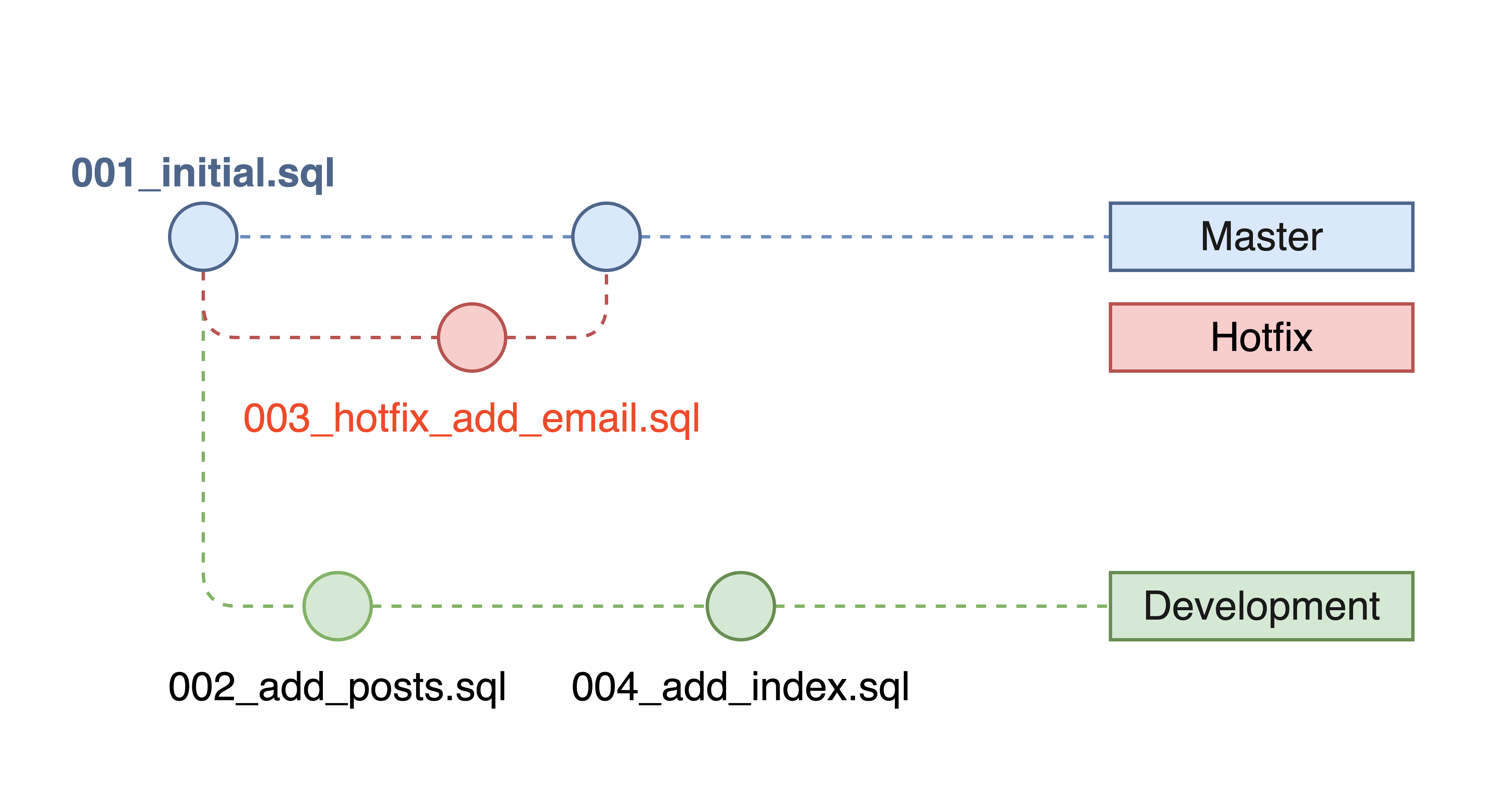
After merging master into dev - the problem:
001_initial.sql - Applied to production002_add_posts.sql - Dev-only, not applied to production003_hotfix_add_email.sql - Applied to production004_add_index.sql - Dev-only, not applied to productionThis creates a non-linear migration history where migration files 002 and 004 were created before and after the hotfix timestamp but haven't been applied to production.
When using Atlas on my macOS, I can run atlas migrate apply without any issues, and it applies the migrations successfully.
But when running in CI on linux, I get the following error: Error: checksum mismatch
This issue is likely due to differences in line endings between operating systems. macOS uses LF (Line Feed) for line endings,
while Windows uses CRLF (Carriage Return + Line Feed). When you run Atlas commands in a Docker container,
it may be using a different line ending format than what your migrations were created with.
In version control systems like Git, a changeset represents an atomic unit of change. It groups related file modifications under a single hash, allowing them to be reviewed, applied, or reverted together.
In database migrations, a changeset is a unit of schema or data changes made up of SQL statements stored in a migration file, typically executed together in a single transaction.