Atlas as a Flyway Alternative: Why Teams Switch
Modern database development requires deterministic planning, end-to-end automation, and guardrails that prevent outages. Atlas is a schema-as-code system that supports both declarative and versioned workflows, integrates deeply with CI/CD, and offers integrated policy and testing frameworks. Flyway is a traditional migration runner that executes SQL scripts in order.
This document summarizes Atlas's capabilities and compares them with Flyway's to help you decide which tool is best for your team.
This document is maintained by the Atlas team. The Flyway licensing, edition, and rollback details below were verified against Redgate's documentation in September 2026. It may still contain outdated information or mistakes. For Flyway's latest details and their own comparison, please refer to the official Flyway (Redgate) website.
Many of Atlas's capabilities are part of the Atlas Pro plan. Running
atlas login starts a free 30-day trial.
What Changes When You Move From Flyway to Atlas
Flyway established the versioned migration pattern and does the job reliably. The main advantages teams gain by adopting Atlas include:
- Migration planning. Flyway migrations are hand-authored. Generating them instead runs through the Enterprise comparison engine, which only covers SQL Server, Oracle, PostgreSQL, and MySQL rather than Flyway's full supported list. Atlas plans the migration itself, diffing the declared schema against the current state on every engine it supports.
- Rollback. A Flyway undo migration is a script authored for each forward migration. It covers schema changes rather than data, and cannot recover a migration that failed partway, because it reverses a whole migration rather than a partial one. Atlas computes the down plan from the live database, including after a partial failure, so there is nothing to author per migration. Both tools place rollback in a paid tier; the difference is what the rollback is, not what it costs.
- Safety checks. Flyway's policy-as-code enforcement runs pre-merge in Enterprise. Atlas's analyzers flag destructive, data-dependent, and locking changes both locally and in CI, with custom rules to enforce your own conventions. The difference is what gets checked and when.
- Tenant fleets. A Flyway Teams license covers up to 100 schemas, and Flyway applies migrations one target at a time, so a fleet is a loop over connections. Atlas plans and applies a change across a whole tenant group in a single operation.
- Schema registry. Flyway tracks migration state in
flyway_schema_history, per database, with nothing above that layer. The Atlas Registry sits above it: schemas and migration directories are versioned centrally, production deploys pull fromatlas://<dir>instead of a git checkout, and it holds the deployment state of every target, drift status, ERD, docs, and the column-level lineage graph. It is the system of record for your database infrastructure, not just a table of applied checksums.
Quick Comparison
| Feature / Capability | Atlas | Flyway (Redgate) |
|---|---|---|
| Workflows | Declarative (state-based) and versioned | Versioned (manual SQL files). Automating state-based deployment via the Schema Model requires an Enterprise license |
| Migration Planning | Automatic diff-based planning from the declared schema | Manual SQL. Script generation through the comparison engine is an Enterprise feature, covering SQL Server, Oracle, PostgreSQL, and MySQL |
| Rollback / Down Migrations | Computed from the live database with atlas migrate down, including after a partial failure | Undo migrations are a Teams feature (none in Community); scripts are manual unless generated by Enterprise, and partial failures are not handled |
| License | Community Edition under Apache 2.0; standard distribution under the Atlas MSA | Flyway engine under Apache 2.0, but the open-source package excludes the CLI; Community/Teams/Enterprise are Redgate distributions |
| Requirements | Distributed as a static binary and Docker image (~63 MB), no runtime to install | Java-based CLI; the download bundles a JRE, and a supplied JRE must be Java 21 |
| Validation & Linting | Analyzers for destructive, data-dependent, and locking changes, run locally and in CI | Policy-as-code checks are an Enterprise feature; not available in Community or Teams |
| Testing Framework | Unit-style schema/data-migration tests, run locally and in CI/CD, with auto-generation supported | Not available |
| Policy Enforcement | Custom rules in Atlas syntax (e.g., naming conventions, constraints, no-FK policies) | Enterprise policy-as-code enforced before merge; no custom rule language in Community or Teams |
| CI/CD Integration | Native GitHub, GitLab, Azure DevOps, Bitbucket, CircleCI actions | CLI, Maven and Gradle plugins, Docker images; official GitHub Actions since March 2026; Enterprise adds native CI/CD integrations |
| Kubernetes Integration | Official Kubernetes Operator with CRDs (AtlasSchema, AtlasMigration), GitOps-ready, Argo CD supported | No official operator |
| Terraform Integration | Official Terraform Provider (atlas_schema, atlas_migration) | No provider |
| Cloud Registry & Docs | Atlas Cloud with auto-generated schema docs, ERDs, column-level lineage, SOC2-audited history, PR checks | Not available |
| Multi-tenant Migrations | Tenant groups planned and applied in one operation, database-per-tenant and schema-per-tenant | One target per run, so a fleet is a loop over connections; a Teams license covers up to 100 schemas |
| Secrets Manager Integration | Supports environment variables and standard secret managers (AWS, GCP, Azure, etc.) in community edition (Vault support in Pro) | Enterprise feature only |
| Database Support | PostgreSQL, MySQL/MariaDB, SQLite, and TiDB in every edition; SQL Server, Oracle, ClickHouse, CockroachDB, Redshift, Spanner, Snowflake, and more with Atlas Pro drivers | 50+ platforms, including cloud-managed variants of the same engine (RDS, Aurora, Cloud SQL); the Enterprise comparison features cover a narrower set |
| AI Integration | Atlas Copilot assistant for schema guidance and testing, plus instructions for Copilot, Cursor and Claude Code, all executed through Atlas's deterministic engine | No built-in assistant in the CLI |
| Database Security as Code | Declarative roles, users, grants, and permissions with automatic diffing | Not supported - requires manual GRANT/REVOKE in SQL scripts |
| Declarative Data Management | Define seed data in desired state; Atlas computes minimal diffs | Repeatable migrations and callbacks for seeding; no upsert, no declarative diffing |
Migration Workflows: Declarative and Versioned
Atlas supports two workflows for managing schema changes: declarative (state-based) and versioned (migrations-based). In both workflows, Atlas inspects the "current state," compares it to the "desired state," and plans the necessary statements to reach the desired state using a single deterministic migration planner.
Current State vs Desired State
- Current state: In the declarative workflow (Terraform-like workflow), the current state is typically a live database. In the versioned workflow, the current state is the result of applying all migration files in order. Atlas supports both workflows.
- Desired state: The desired state defines the target schema. It can be defined using HCL schema files, SQL schema files, another database, ORM providers (such as Hibernate, GORM, Drizzle, Django, or SQLAlchemy), or a combination of these sources. For example, you can define your core schema in an ORM and augment it with SQL files that add triggers, RLS policies, functions, or other constructs.
Key Differences Between Atlas and Flyway
Unlike Flyway, where you write and maintain ordered SQL migration files manually, Atlas automates migration planning based on the difference between the current and desired states.
- Declarative - Atlas compares the desired state to the current database, plans safe migrations based on defined policies, and applies them automatically on the target database.
- Versioned - You define the desired schema in code (or another database), but instead of writing SQL yourself (as in Flyway),
you run
atlas migrate diffto generate migration files that transition the current state of the migrations directory to the desired state.
Both workflows can be automated in CI/CD using Atlas Actions (GitHub, GitLab, Azure DevOps, etc.) or the Atlas CLI. After changes are planned, Atlas validates them with migration linting and policy checks before execution.
Read more at:
- Automatic Migration Planning
- Schema as Code: SQL syntax
- Schema as Code: HCL syntax
- ORM integrations: Supports, Python, Go, Java, JS/TS, C#, and more.
Migration Safety, Policy, and Governance
Atlas treats database logic like application code: it can be linted, validated, and unit-tested after each change. Flyway offers policy-as-code checks and drift monitoring in its Enterprise edition; Atlas puts these checks into the CLI workflow itself, before merge and before apply:
- Testing framework - Atlas's testing framework lets you write unit-style tests for schema and data migrations. Tests run locally and in CI to catch issues before deployment. Using Atlas Copilot, you can also generate tests automatically.
- Policy-aware planning - Changes are checked against team policies (e.g., create indexes concurrently). Planning is not just about moving from state A to state B, but doing so in a way that respects your team's conventions and requirements.
- Validation and analyzers - The
atlas migrate lintandatlas schema lintcommands check migrations for semantic correctness, warn about locking operations, table copies, destructive changes, and incompatible modifications, and suggest safer alternatives. Linters run locally and in CI/CD. They respect company policies and work on both migration files and schema definitions. Atlas Actions in CI can block merges if linting fails and support code comments in SQL, HCL, Go, Python, Java, and more. - Policy enforcement - Write custom rules in the Atlas Rules Language to enforce company policies (e.g., naming conventions, no foreign keys). Policies run during diff, lint, and apply.
- Pre-migration checks - Embed SQL assertions in a migration to verify conditions (e.g., a table is empty before dropping it). If a check fails, the migration aborts.
- Migration directory integrity - Atlas enforces migration history integrity automatically to detect and prevent conflicts that arise when multiple branches introduce overlapping changes.
Read more at:
Down Migrations and Rollback
Rolling Back vs Going Down
Rolling back schema changes is often confused with "going down", but the concepts are not the same:
- Rollback - Happens at the transaction level. If a migration fails in a database that supports transactional DDLs (like PostgreSQL), the entire transaction is aborted and the schema returns to its pre-migration state. On databases without transactional DDLs (like MySQL), a failed migration may leave the schema partially applied.
- Going Down - Refers to intentionally reverting previously applied migrations to reach an earlier version or tag. This requires the migration tool to understand the database state and apply reverse changes across multiple files. The tool must generate a short, safe sequence of statements that revert the schema to the desired state, even if the last migration was partially applied or failed.
Flyway vs Atlas
- Flyway - Undo migrations are authored per forward migration, or generated by the Enterprise comparison engine. They assume the forward migration completed and do not handle partial failures.
- Atlas - The
atlas migrate downcommand computes a rollback plan dynamically. It inspects the current database state and generates the exact sequence of statements required to revert to a chosen version, tag, or number of steps back.- Works even if the last migration was partially applied or failed.
- Runs pre-migration checks by default to prevent destructive operations.
- Supports
--dry-runfor previews, and in Atlas Cloud you can enforce review/approval policies before execution. - Executes transactionally when supported, or statement-by-statement with proper history tracking.
- Approval workflows can be enforced in CI/CD or Atlas Cloud for down migrations.
Read more at:
CI/CD Integration and Platform Fit
Atlas ships first-party integrations for the CI/CD and infrastructure tools most teams already run:
- Kubernetes and Terraform - A Kubernetes operator and Terraform provider let you manage schema changes declaratively alongside your infrastructure. This enables GitOps-style deployments where the database state is version-controlled and automatically applied, just like application code or infrastructure settings.
- CI/CD integrations - GitHub, GitLab, CircleCI, Bitbucket, and Azure DevOps actions for easy integration. These integrations support all Atlas workflows, provide PR/code comments, run summaries, and can enforce policies or block merges if migration linting fails. This ensures schema changes are reviewed and tested before deployment.
- Webhooks and alerts - Integrate schema drift and migration events into your existing monitoring or approval systems. Atlas Cloud can notify Slack channels, trigger webhooks, or connect to incident management tools when issues arise, giving teams visibility and control over production changes.
- GitOps with Argo CD - Manage schemas declaratively with the Atlas Kubernetes Operator and sync them via Argo CD.
Use Git as the single source of truth, apply schema manifests in sync waves (database → schema → app), and define
custom health checks for
AtlasSchemaresources to ensure safe, ordered rollouts of database changes. This approach makes schema deployments reproducible, observable, and fully aligned with the GitOps workflow.
Read more at:
- CI integration: GitHub Actions, CircleCI, GitLab CI Components, BitBucket Pipelines.
- Azure DevOps
Kubernetes Native
Atlas provides a production-ready Kubernetes Operator that uses Kubernetes CRDs (Custom Resource Definitions) to manage
schema state as a first-class Kubernetes resource. You can choose between declarative or versioned workflows,
backed by AtlasSchema and AtlasMigration CRDs respectively.
apiVersion: db.atlasgo.io/v1alpha1
kind: AtlasSchema
metadata:
  name: myapp-schema
spec:
  url: postgresql://myapp-db:5432/myapp
  schema:
    sql: |
      CREATE TABLE users (
        id UUID PRIMARY KEY DEFAULT gen_random_uuid(),
        email VARCHAR(255) UNIQUE NOT NULL
      );
  policy:
    lint:
      destructive:
        error: true
Features and capabilities:
- Support for both declarative (desired-state) and versioned (migration file driven) schema workflows via Kubernetes.
- Installation with flexible configuration including environments, project settings, SSL certificates, and secret management.
- Pre-approval and ad-hoc approval flows for declarative schema changes, so some changes can be gated or automatically approved depending on policy or environment.
- Automatic drift reconciliation: the operator continuously monitors the actual database vs the declared CRD schema, and reconciles differences.
- Kubernetes-native patterns: GitOps compatibility, RBAC, leveraging Kubernetes secrets, project configuration injection, separation of environments, etc.
Flyway doesn't provide an official Kubernetes Operator.
 GitOps with Argo CD
 GitOps with Flux CD
 GitOps with Atlas Cloud
Terraform Provider
Atlas offers a first-class Terraform provider that makes database schemas part of your Infrastructure-as-Code workflows. With support for both declarative and versioned migration modes, teams can choose the workflow that best fits their delivery model.
resource "atlas_schema" "myapp" {
  hcl        = file("schema.hcl")
  url        = var.database_url
  dev_db_url = "docker://postgres/15/dev"
}
Capabilities and features:
- Two workflows supported - Use the
atlas_schemaresource for declarative workflows or theatlas_migrationresource for versioned workflows. This gives teams flexibility to manage the desired state or explicit migration histories within Terraform, respectively. - Infrastructure-as-Code for schemas - Schemas are defined as Terraform resources and managed alongside application and infrastructure code.
- State management and drift detection - Atlas checks whether the live database matches the declared schema and reconciles differences automatically.
- Ad-hoc approvals - Declarative schema changes can be gated with approval flows, ensuring sensitive or production environments require explicit review before applying changes.
- Native Terraform integration - Works seamlessly with existing Terraform workflows, variables, external data sources, and modules.
Flyway has no official Terraform provider.
Atlas Cloud: Registry, Docs, and Drift Monitoring
Atlas Cloud centralizes schema management. When you push schemas and migrations to the registry, you get:
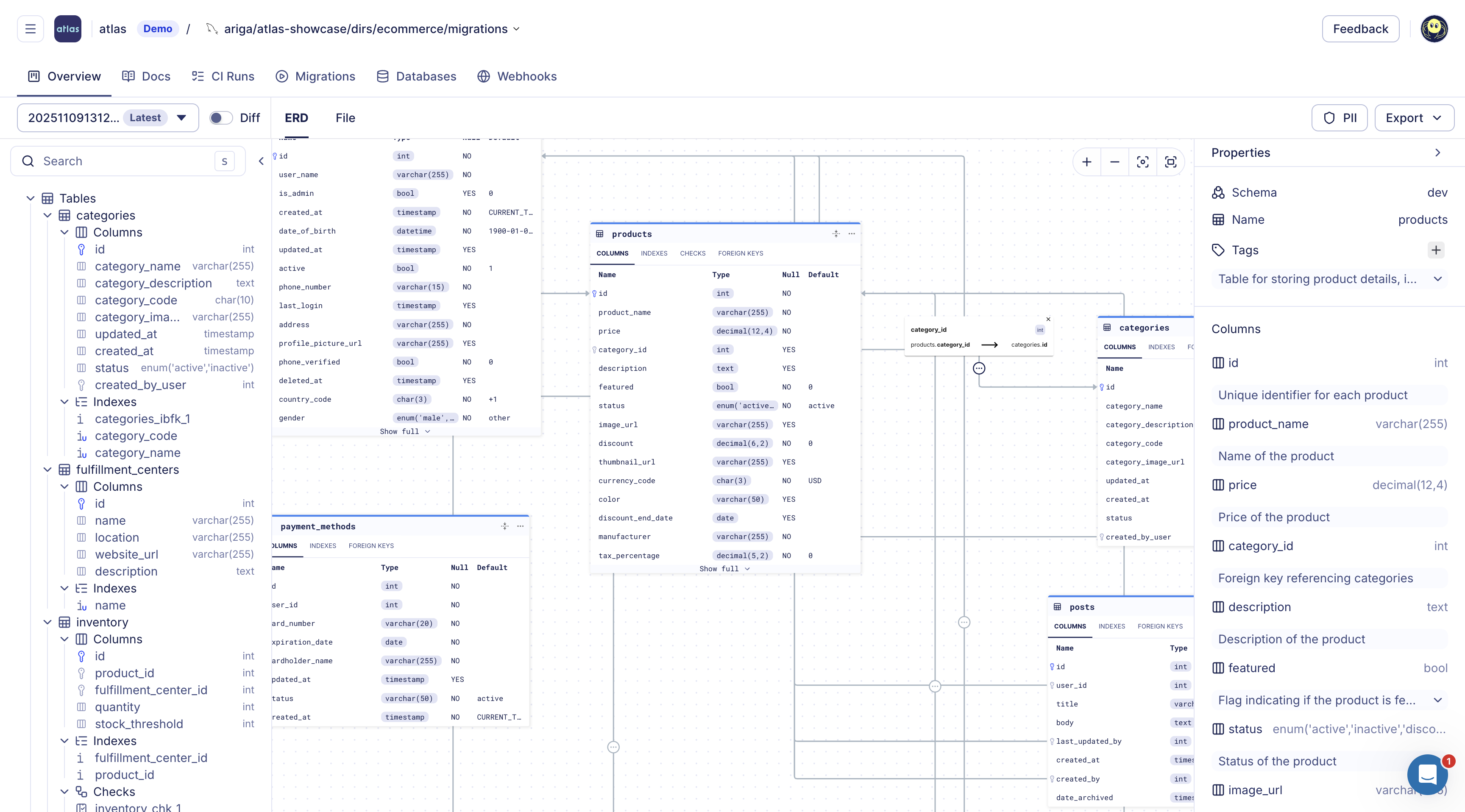
- Schema Registry - A central store for schema versions and migration directories. Each push generates an ER diagram, searchable documentation, and SOC2-audited history of schema and migration changes.
- Always-up-to-date docs - Cloud regenerates human-readable documentation and ERDs whenever a new version is pushed. Documentation is derived from schema and migration files only, ensuring accuracy and avoiding direct database or SCM connections.
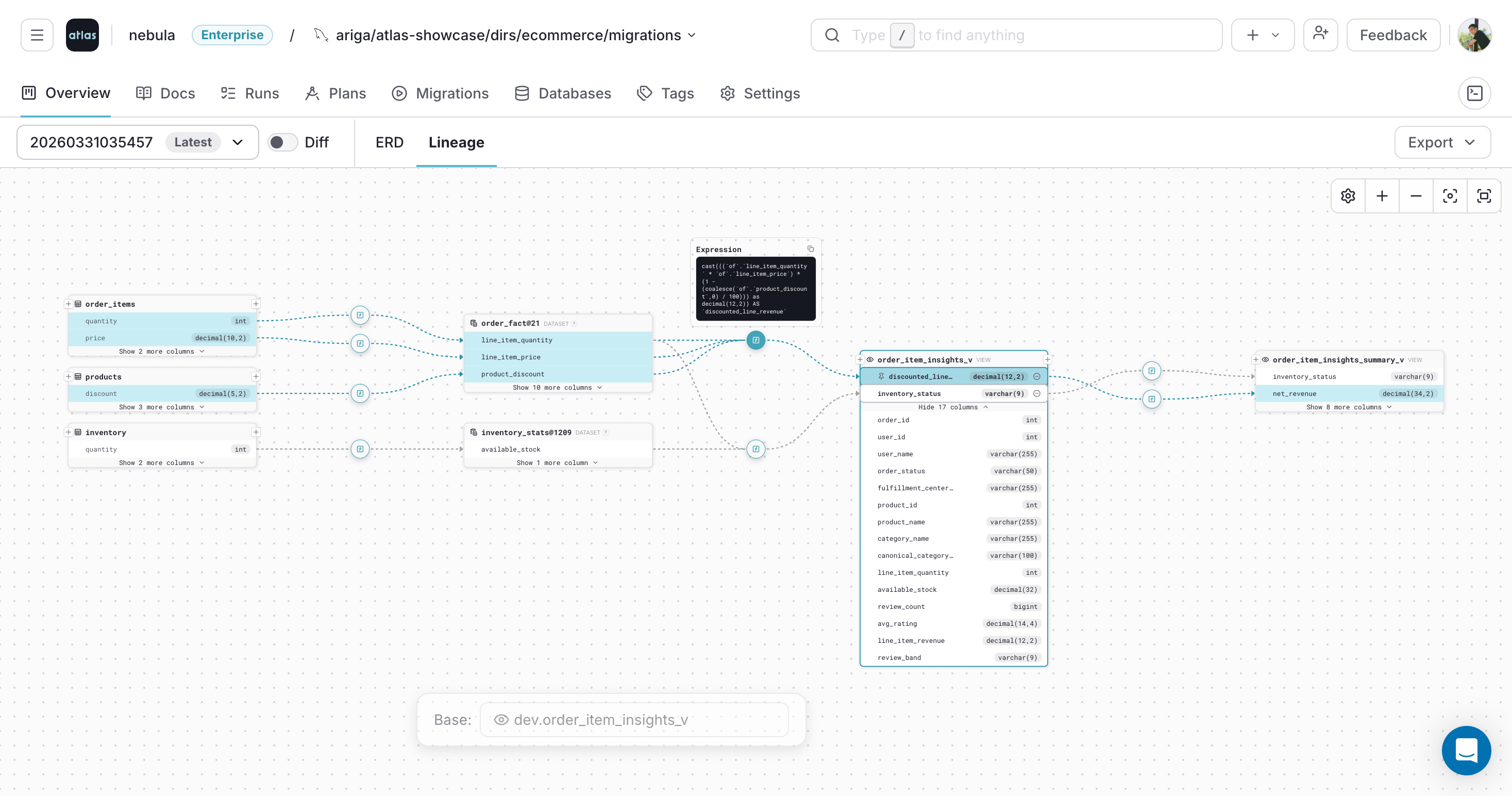
- Column-level lineage - Trace how columns are derived across tables, views, and datasets.
- Pull-request checks - Cloud allows running the same linters and policy checks in CI and can block merges if rules are violated.
- Drift detection - Using Atlas Agent or CI actions, you can inspect production databases continuously. If the actual schema drifts from the expected state, Cloud sends alerts with detailed HCL/SQL diffs.
- Notifications - Configure Slack and webhook alerts to be notified of drift, failed migrations, or other events.
- Column-Level Lineage
- ERD
Read more at:
Multi-tenant Migrations
Atlas includes built-in support for managing multi-tenant database environments, commonly used in database-per-tenant and schema-per-tenant architectures. With Atlas, teams can define logical tenant groups to plan and apply schema changes across many databases in a single operation. This simplifies the management of large fleets while ensuring consistency and reducing the risk of drift or deployment errors.
Atlas and AI Tools
AI tools like GitHub Copilot, Cursor, and Claude Code are great at writing code, but generating database migrations is a different challenge. As schemas grow more complex, ensuring migrations are deterministic, predictable, and aligned with company policies becomes critical.
Atlas solves this problem by letting AI tools focus on editing the schema while Atlas provides the infrastructure for:
- Migration Generation - Producing safe, deterministic migrations automatically.
- Migration Validation - Ensuring migrations follow best practices.
- Policy Enforcement - Enforcing organizational rules on schema changes.
- Unit Testing - Executing test functions, views, and queries written by AI tools, reporting failures, and guiding fixes.
- Data Migration Testing - Allowing AI tools to generate data migrations, seed data, run tests, and detect errors.
Copilot and Ask Atlas - Atlas also includes a built-in chat assistant that can answer questions about your project, explain migration errors, generate schema tests, and suggest safer patterns. All commands go through Atlas's deterministic engine - raw SQL is never executed directly.
To learn more, check out the Atlas with AI Tools docs.
 GitHub Copilot Instructions
 Cursor Instructions
 Claude Code Instructions
 OpenAI Codex Instructions
Database Security as Code
Managing database access control (roles, users, grants, and permissions) is a critical responsibility, especially in regulated industries.
Flyway manages security objects the same way as any other change: GRANT, REVOKE, CREATE ROLE, and similar statements in versioned SQL scripts. There is no declarative definition of roles and grants to diff against.
Atlas provides Database Security as Code. Teams define their desired security posture (roles, users, grants, and permissions) declaratively alongside their schema in HCL or SQL. Atlas diffs the current security state against the desired state and plans the required changes automatically. Security changes flow through the same CI/CD pipeline as schema changes - linted, reviewed, and deployed with full audit trails.
- HCL
- SQL
role "app_reader" {
  login = false
}

role "app_writer" {
  login     = true
  member_of = [role.app_reader]
}

permission {
  to         = role.app_reader
  for        = table.users
  privileges = [SELECT]
}

permission {
  to         = role.app_writer
  for        = table.users
  privileges = [SELECT, INSERT, UPDATE]
}
CREATE ROLE app_reader NOLOGIN;
CREATE ROLE app_writer LOGIN IN ROLE app_reader;

GRANT SELECT ON TABLE users TO app_reader;
GRANT SELECT, INSERT, UPDATE ON TABLE users TO app_writer;
Beyond defining and diffing security state, Atlas lets teams enforce custom security policies using its schema rules engine.
This completes the security lifecycle: define → diff → enforce → audit. For an overview of how Atlas supports database governance end-to-end, see the Database Governance use case.
Declarative Data Management
Applications often depend on reference data (lookup tables, feature flags, configuration values) that must exist for correct operation.
Flyway supports repeatable migrations (R__ prefix) that re-execute when the file's checksum changes, and afterMigrate callbacks for seeding. However, Flyway has no upsert logic and does not diff current data against a desired state. The developer must write the full INSERT or MERGE logic manually.
Atlas provides Declarative Data Management. Teams define
seed data directly in their desired state file using HCL data blocks
or SQL INSERT statements. Atlas computes the minimal set of INSERT,
UPDATE, or DELETE statements needed to bring the data to the desired
state. Sync modes include UPSERT and REPLACE. Data is versioned alongside
the schema and deployed through the same CI/CD pipeline.
- HCL
- SQL
table "countries" {
  schema = schema.public
  column "id" {
    type = int
  }
  column "code" {
    type = varchar(2)
  }
  column "name" {
    type = varchar(100)
  }
  primary_key {
    columns = [column.id]
  }
}

data {
  table = table.countries
  rows = [
    { id = 1, code = "US", name = "United States" },
    { id = 2, code = "IL", name = "Israel" },
    { id = 3, code = "DE", name = "Germany" },
  ]
}
CREATE TABLE countries (
    id INT PRIMARY KEY,
    code VARCHAR(2) NOT NULL,
    name VARCHAR(100) NOT NULL
);

INSERT INTO countries (id, code, name) VALUES
    (1, 'US', 'United States'),
    (2, 'IL', 'Israel'),
    (3, 'DE', 'Germany');
To learn more, see the HCL or SQL data management docs.
Database Support: Depth vs Breadth
Flyway lists 50+ supported database platforms, but the count folds in cloud-managed variants of the same engine as separate entries: Amazon RDS for PostgreSQL, Aurora PostgreSQL, and Google Cloud SQL for PostgreSQL each count on their own alongside PostgreSQL itself, and the same pattern repeats for MySQL, MariaDB, SQL Server, and Oracle. The number of genuinely distinct engines is smaller than the headline figure, and the Enterprise comparison features cover a narrower set still.
Atlas supports a more focused set of engines and provides the same depth for each: schema inspection and diffing and automatic migration planning in every edition, and with Atlas Pro policy enforcement, testing, and drift detection. PostgreSQL, MySQL/MariaDB, SQLite, and TiDB are in every Atlas edition; SQL Server, Oracle, ClickHouse, CockroachDB, Redshift, Spanner, Snowflake, and the other drivers are part of Atlas Pro.
Summary
Both Atlas and Flyway serve their purpose in the ecosystem. Flyway established important patterns for database migrations. Atlas keeps the versioned migration model and adds planning from a declared schema, rollback computed from the live database, and checks that run before merge.
 Flyway vs Liquibase