GitHub Container Registry as the Schema Registry for GitHub Actions
A schema repository holds a schema's versions, tags, and plans. It's stored in
Atlas Cloud unless its repo block sets
url to your own storage, such as an
OCI registry. This guide stores it in your repository's GitHub Container Registry
(GHCR) package and runs the whole declarative flow in GitHub Actions:
- Pull requests plan each change and store the plan in GHCR as
PENDING. - Merging a pull request approves its plan (pre-approval) and pushes the new schema version.
- Deployments run the approved plan. A change that reaches the database without one (for example, someone changed the database by hand) and has lint errors waits for an ad-hoc approval. With no Atlas Cloud page to approve on, a person approves it by running a workflow.
Schema plans and approvals require Atlas Pro, also when the schema repository is
stored outside Atlas Cloud. To create an account or start a trial, run atlas login.
Overview
| When | Step | Result |
|---|---|---|
| Pull request | schema/plan | A PENDING plan in GHCR, pr-<number>-<hash> |
| Merge | schema/plan/approve, then schema/push | The PR's plan is APPROVED; the new state is pushed as latest and tagged with the commit |
| Deploy | schema/apply --to atlas://app?tag=<commit> | Runs the plan approved on the PR |
| Deploy, no approved plan, lint errors | schema/apply with lint-review: ERROR | A PENDING ad-hoc plan in GHCR |
| Approval | The Approve schema plan workflow | The ad-hoc plan is APPROVED |
| Deploy, continued | schema/apply with wait-timeout | Runs the ad-hoc plan |
Prerequisites
- Atlas v1.4.1 or later
ariga/atlas-actionv1.18.3 or later- An Atlas bot token in the
ATLAS_TOKENrepository secret DATABASE_URL_READONLY: a repository secret with the target database URL for a read-only userDATABASE_URL: the target database URL, stored as a secret of aproductionenvironment whose deployment branches are limited tomasterDEV_DATABASE_URL, only for databases that don't run in Docker (such as Snowflake, Redshift, and Databricks): a repository secret with the URL of a dev database you provide
Both target database URLs use the same scope as the dev database in
atlas.hcl (Step 1).
Pull request plans and the approval on merge use DATABASE_URL_READONLY. Pull request jobs run the
branch's code, so anyone with write access to the repository can read this URL, which is why its
user can only read. Only the deploy job gets DATABASE_URL, and the environment's branch limit keeps
it out of pull request jobs.
The job's own GITHUB_TOKEN creates the GHCR package on the first write, so you don't need a
personal access token.
Guide: Declarative Migrations with GHCR
Step 1: Set up the Atlas project
Create schema.sql with the desired schema, and atlas.hcl with two envs. atlas.hcl reads the
registry URL from the environment, since it contains a credential. The dev database sets the
scope, and both database URLs use the same one:
- PostgreSQL (Schema Scope)
- PostgreSQL (Database Scope)
- MySQL
- SQL Server
- ClickHouse
- Snowflake
- Other
CREATE TABLE users (
  id bigint NOT NULL,
  name text NOT NULL,
  PRIMARY KEY (id)
);
# The target database. Plans, approvals, and deployments all read it, so they start from the same state.
env "prod" {
  # Schema scope, like dev: postgres://<user>:<pass>@<host>:5432/<db>?sslmode=require&search_path=public
  url = getenv("DATABASE_URL")
  dev = "docker://postgres/17/dev?search_path=public"
  schema {
    src = "file://schema.sql"
    repo {
      name = "app"
      url  = getenv("ATLAS_REGISTRY_URL")
    }
  }
}

# The registry alone, with no database: used to push versions and to approve plans.
env "registry" {
  dev = "docker://postgres/17/dev?search_path=public"
  schema {
    src = "file://schema.sql"
    repo {
      name = "app"
      url  = getenv("ATLAS_REGISTRY_URL")
    }
  }
}

lint {
  # Changes with lint errors need an approved plan. Keep it in sync with `lint-review` in the workflow.
  review = ERROR
}
CREATE TABLE "public"."users" (
  id bigint NOT NULL,
  name text NOT NULL,
  PRIMARY KEY (id)
);
# The target database. Plans, approvals, and deployments all read it, so they start from the same state.
env "prod" {
  # Database scope, like dev: postgres://<user>:<pass>@<host>:5432/<db>?sslmode=require
  url = getenv("DATABASE_URL")
  dev = "docker://postgres/17/dev"
  schema {
    src = "file://schema.sql"
    repo {
      name = "app"
      url  = getenv("ATLAS_REGISTRY_URL")
    }
  }
}

# The registry alone, with no database: used to push versions and to approve plans.
env "registry" {
  dev = "docker://postgres/17/dev"
  schema {
    src = "file://schema.sql"
    repo {
      name = "app"
      url  = getenv("ATLAS_REGISTRY_URL")
    }
  }
}

lint {
  # Changes with lint errors need an approved plan. Keep it in sync with `lint-review` in the workflow.
  review = ERROR
}
In database scope, Atlas operates on all schemas in the database. Qualify each table with its schema
in schema.sql, as the plans do ("public"."users").
CREATE TABLE users (
  id bigint NOT NULL,
  name text NOT NULL,
  PRIMARY KEY (id)
);
# The target database. Plans, approvals, and deployments all read it, so they start from the same state.
env "prod" {
  # Schema scope, like dev: mysql://<user>:<pass>@<host>:3306/<db>
  url = getenv("DATABASE_URL")
  dev = "docker://mysql/8/dev"
  schema {
    src = "file://schema.sql"
    repo {
      name = "app"
      url  = getenv("ATLAS_REGISTRY_URL")
    }
  }
}

# The registry alone, with no database: used to push versions and to approve plans.
env "registry" {
  dev = "docker://mysql/8/dev"
  schema {
    src = "file://schema.sql"
    repo {
      name = "app"
      url  = getenv("ATLAS_REGISTRY_URL")
    }
  }
}

lint {
  # Changes with lint errors need an approved plan. Keep it in sync with `lint-review` in the workflow.
  review = ERROR
}
CREATE TABLE users (
  id bigint NOT NULL,
  name nvarchar(100) NOT NULL,
  PRIMARY KEY (id)
);
# The target database. Plans, approvals, and deployments all read it, so they start from the same state.
env "prod" {
  # Schema scope, like dev: sqlserver://<user>:<pass>@<host>:1433?database=<db>&mode=schema
  url = getenv("DATABASE_URL")
  dev = "docker://sqlserver/2022-latest/dev?mode=schema"
  schema {
    src = "file://schema.sql"
    repo {
      name = "app"
      url  = getenv("ATLAS_REGISTRY_URL")
    }
  }
}

# The registry alone, with no database: used to push versions and to approve plans.
env "registry" {
  dev = "docker://sqlserver/2022-latest/dev?mode=schema"
  schema {
    src = "file://schema.sql"
    repo {
      name = "app"
      url  = getenv("ATLAS_REGISTRY_URL")
    }
  }
}

lint {
  # Changes with lint errors need an approved plan. Keep it in sync with `lint-review` in the workflow.
  review = ERROR
}
CREATE TABLE users (
  id UInt64,
  name String
)
ENGINE = MergeTree
PRIMARY KEY (id)
ORDER BY (id);
# The target database. Plans, approvals, and deployments all read it, so they start from the same state.
env "prod" {
  # Schema scope, like dev: clickhouse://<user>:<pass>@<host>:9000/<db>
  url = getenv("DATABASE_URL")
  dev = "docker://clickhouse/23.11/dev"
  schema {
    src = "file://schema.sql"
    repo {
      name = "app"
      url  = getenv("ATLAS_REGISTRY_URL")
    }
  }
}

# The registry alone, with no database: used to push versions and to approve plans.
env "registry" {
  dev = "docker://clickhouse/23.11/dev"
  schema {
    src = "file://schema.sql"
    repo {
      name = "app"
      url  = getenv("ATLAS_REGISTRY_URL")
    }
  }
}

lint {
  # Changes with lint errors need an approved plan. Keep it in sync with `lint-review` in the workflow.
  review = ERROR
}
CREATE TABLE users (
  id INT NOT NULL,
  name VARCHAR(255) NOT NULL,
  PRIMARY KEY (id)
);
# The target database. Plans, approvals, and deployments all read it, so they start from the same state.
env "prod" {
  # Schema scope, like dev: snowflake://<user>:<pass>@<account_identifier>/<database>/<schema>?warehouse=<warehouse>
  url = getenv("DATABASE_URL")
  # An empty schema in another Snowflake database.
  dev = getenv("DEV_DATABASE_URL")
  schema {
    src = "file://schema.sql"
    repo {
      name = "app"
      url  = getenv("ATLAS_REGISTRY_URL")
    }
  }
}

# The registry alone, with no database: used to push versions and to approve plans.
env "registry" {
  dev = getenv("DEV_DATABASE_URL")
  schema {
    src = "file://schema.sql"
    repo {
      name = "app"
      url  = getenv("ATLAS_REGISTRY_URL")
    }
  }
}

lint {
  # Changes with lint errors need an approved plan. Keep it in sync with `lint-review` in the workflow.
  review = ERROR
}
Snowflake doesn't run in Docker, so the dev database is a schema in another Snowflake database (Providing Your Own Dev Database). In the workflows below:
- Add
flavor: snowflaketo everyariga/setup-atlasstep. The Snowflake driver ships in Atlas's extended build. - Add
DEV_DATABASE_URL: ${{ secrets.DEV_DATABASE_URL }}to theenvof theplan,approve-push, anddeployjobs. The approval workflow doesn't need it. Pull request jobs read it, so its user should have access to the dev database only.
Write schema.sql in your database's SQL dialect. Set dev to a dev database
URL for your database, at the same scope as DATABASE_URL. If your database doesn't run in Docker,
read it from the DEV_DATABASE_URL secret, as in the Snowflake tab. If your database uses one of the
custom drivers, set flavor on
ariga/setup-atlas too.
# The target database. Plans, approvals, and deployments all read it, so they start from the same state.
env "prod" {
  # A URL at the same scope as dev.
  url = getenv("DATABASE_URL")
  dev = "<dev database URL>"
  schema {
    src = "file://schema.sql"
    repo {
      name = "app"
      url  = getenv("ATLAS_REGISTRY_URL")
    }
  }
}

# The registry alone, with no database: used to push versions and to approve plans.
env "registry" {
  dev = "<dev database URL>"
  schema {
    src = "file://schema.sql"
    repo {
      name = "app"
      url  = getenv("ATLAS_REGISTRY_URL")
    }
  }
}

lint {
  # Changes with lint errors need an approved plan. Keep it in sync with `lint-review` in the workflow.
  review = ERROR
}
If ATLAS_REGISTRY_URL is empty, the repository falls back to Atlas Cloud. Both workflows below set
it to the repository's GHCR package, written with the job's own token:
env:
  ATLAS_REGISTRY_URL: oci://x-access-token:${{ github.token }}@ghcr.io/${{ github.repository }}-schema
GHCR ignores the username, so the URL uses a fixed one: a bot actor such as renovate[bot] would make
it invalid. Package names must be lowercase: if the repository name has capital letters, write the path
in lowercase instead of ${{ github.repository }}.
Step 2: Add the CI/CD workflow
The workflow has one job for each stage of the flow:
| Job | Runs on | What it does |
|---|---|---|
plan | Pull requests | Plans the change from the database's current state, lints it, comments it on the pull request, and stores it in GHCR as PENDING |
approve-push | Pushes and manual runs on master | Approves the merged pull request's plan, then pushes the new desired state tagged with the commit |
deploy | After approve-push | Deploys the pushed version. It's the only job that gets DATABASE_URL |
approve-push approves only the plan of the pull request it merged:
- On a push, it finds the merged pull request and passes that PR's plan (
pr-<number>-…) toschema/plan/approve. - On a manual run, it approves nothing and only pushes.
- It runs only on
master, so a run from another branch can't push that branch's schema.
deploy runs schema/apply up to twice:
-
The first run has no
wait-timeout:- If the pull request's plan is approved, it runs that plan.
- If there's no approved plan and the lint is clean, it applies the change directly.
- If there's no approved plan and the lint has errors, it stores an ad-hoc plan in GHCR as
PENDINGand fails.continue-on-errorkeeps the job going.
The job summary shows the plan with its SQL and lint results.
-
The next step adds a link to the approval workflow to the job summary, and a warning annotation. If the pending plan is a pull request's plan instead, made while the database had a manual change, the step fails and says to delete that plan.
-
The second run waits for the same plan to be approved, then applies it.
schema/applyreuses a pending plan for the same transition, so it doesn't create a new one.
name: Atlas

on:
  # No path filter on pull requests: if you make this check required, it must report on every PR.
  pull_request:
    branches: [master]
  push:
    branches: [master]
    paths: [schema.sql, atlas.hcl]
  workflow_dispatch:

# One deployment at a time: a deployment waiting for an approval holds the group, and GitHub keeps
# only the newest run queued behind it. A new commit on a pull request cancels the PR's previous run.
concurrency:
  group: atlas-${{ github.event.number || 'deploy' }}
  cancel-in-progress: ${{ github.event_name == 'pull_request' }}

permissions:
  contents: read

env:
  # The registry is this repository's GHCR package, written with the job's own token.
  ATLAS_REGISTRY_URL: oci://x-access-token:${{ github.token }}@ghcr.io/${{ github.repository }}-schema

jobs:
  plan:
    if: github.event_name == 'pull_request'
    runs-on: ubuntu-latest
    permissions:
      contents: read
      pull-requests: write   # the plan comment
      packages: write        # the PENDING plan
    env:
      DATABASE_URL: ${{ secrets.DATABASE_URL_READONLY }}
    steps:
      - uses: actions/checkout@v4
      - uses: ariga/setup-atlas@v0
        with:
          version: v1.4.1
          cloud-token: ${{ secrets.ATLAS_TOKEN }}
      - uses: ariga/atlas-action/schema/plan@v1
        with:
          env: prod
        env:
          GITHUB_TOKEN: ${{ github.token }}

  approve-push:
    # Only master pushes versions and deploys: a manual run from another branch would push its
    # unreviewed schema.
    if: github.ref == 'refs/heads/master'
    runs-on: ubuntu-latest
    permissions:
      contents: read
      pull-requests: read   # find the merged pull request
      packages: write       # the approval and the new version
    env:
      DATABASE_URL: ${{ secrets.DATABASE_URL_READONLY }}
    steps:
      - uses: actions/checkout@v4
      - uses: ariga/setup-atlas@v0
        with:
          version: v1.4.1
          cloud-token: ${{ secrets.ATLAS_TOKEN }}
      # Approve only the plan of the pull request this push merged.
      - name: Find the merged pull request's plan
        id: prplan
        if: github.event_name == 'push'
        env:
          GH_TOKEN: ${{ github.token }}
        run: |
          pr=$(gh api "repos/$GITHUB_REPOSITORY/commits/$GITHUB_SHA/pulls" -q '[.[] | select(.merged_at != null)][0].number // empty')
          if [ -z "$pr" ]; then
            echo "No merged pull request for $GITHUB_SHA: nothing to approve."
            exit 0
          fi
          json=$(atlas schema plan list --env prod --pending --format '{{ json . }}')
          mapfile -t plans < <(jq -r --arg n "$pr" '(. // [])[] | select(.Name | startswith("pr-\($n)-")) | .URL' <<<"$json")
          if [ "${#plans[@]}" -gt 1 ]; then
            echo "::error::Several pending plans for pull request #$pr: ${plans[*]}. Delete the stale ones."
            exit 1
          fi
          echo "plan=${plans[0]:-}" >> "$GITHUB_OUTPUT"
      - uses: ariga/atlas-action/schema/plan/approve@v1
        if: steps.prplan.outputs.plan != ''
        with:
          env: prod
          plan: ${{ steps.prplan.outputs.plan }}
      - uses: ariga/atlas-action/schema/push@v1
        with:
          env: registry

  deploy:
    needs: approve-push
    runs-on: ubuntu-latest
    environment: production
    permissions:
      contents: read
      packages: write   # ad-hoc plans
    env:
      DATABASE_URL: ${{ secrets.DATABASE_URL }}
      VERSION: atlas://app?tag=${{ github.sha }}
    steps:
      - uses: actions/checkout@v4
      - uses: ariga/setup-atlas@v0
        with:
          version: v1.4.1
          cloud-token: ${{ secrets.ATLAS_TOKEN }}

      # Runs the plan approved on the PR. Without one, a change with a clean lint applies directly,
      # and a change with lint errors becomes an ad-hoc plan in GHCR. Nothing to apply passes. With no
      # `wait-timeout`, a plan that isn't approved fails the step right away: the action names it in its
      # `plan` and `plan-status` outputs and writes it, with its SQL and lint results, to the job summary.
      - uses: ariga/atlas-action/schema/apply@v1
        id: apply
        continue-on-error: true
        with:
          env: prod
          to: ${{ env.VERSION }}
          lint-review: ERROR

      - name: Ad-hoc plan waiting for approval
        id: adhoc
        if: steps.apply.outcome == 'failure'
        env:
          PLAN: ${{ steps.apply.outputs.plan }}
          STATUS: ${{ steps.apply.outputs.plan-status }}
          APPLY_ERROR: ${{ steps.apply.outputs.error }}
        run: |
          if [ "$STATUS" != PENDING ]; then
            echo "::error::schema apply failed: $APPLY_ERROR"
            exit 1
          fi
          if [[ "$PLAN" == */plans/pr-* ]]; then
            echo "::error::This deployment matches $PLAN: a pull request's plan that is still pending. Usually a pull request planned this change while the database had a manual change; it can also be the merged pull request's own plan if the merge job didn't approve it. The approval workflow refuses pull request plans: delete it with \`atlas schema plan rm --env prod --url $PLAN\`, then re-run this job."
            exit 1
          fi
          echo "plan=$PLAN" >> "$GITHUB_OUTPUT"
          {
            echo "Approve it with the [Approve schema plan]($GITHUB_SERVER_URL/$GITHUB_REPOSITORY/actions/workflows/approve-plan.yml) workflow"
            echo "(\`gh workflow run approve-plan.yml -f plan=$PLAN\`), then re-run this job if it timed out."
          } >> "$GITHUB_STEP_SUMMARY"
          echo "::warning title=Waiting for approval::Run the Approve schema plan workflow with plan=$PLAN"

      - name: Wait for the approval, then apply
        if: steps.adhoc.outputs.plan != ''
        uses: ariga/atlas-action/schema/apply@v1
        with:
          env: prod
          to: ${{ env.VERSION }}
          lint-review: ERROR
          wait-timeout: 30m
          wait-interval: 30s
Step 3: Add the approval workflow
Running this workflow is the approval. The workflow:
- Takes write access to the repository.
- Shows the approved plan and who approved it in its summary.
- Refuses pull request plans (
pr-*). Merging the pull request approves those. - Checks the approver if the repository variable
SCHEMA_APPROVERSis set (GitHub logins, separated by spaces). Runs by anyone else fail.
The registry trusts everyone with write access to the repository. Any workflow in the repository can
write to the GHCR package with its GITHUB_TOKEN, including one that a person with write access runs
from their own branch. SCHEMA_APPROVERS limits who approves with this workflow, not who can write
to the package.
name: Approve schema plan

on:
  workflow_dispatch:
    inputs:
      plan:
        description: "Plan to approve: atlas://app/plans/<name>"
        required: true
        type: string

permissions:
  contents: read
  packages: write   # write the approval to GHCR

env:
  ATLAS_REGISTRY_URL: oci://x-access-token:${{ github.token }}@ghcr.io/${{ github.repository }}-schema

jobs:
  approve:
    name: Approve ${{ inputs.plan }}
    runs-on: ubuntu-latest
    steps:
      - name: Check the plan and the approver
        env:
          PLAN: ${{ inputs.plan }}
          APPROVERS: ${{ vars.SCHEMA_APPROVERS }}
        run: |
          if ! [[ "$PLAN" =~ ^atlas://app/plans/[A-Za-z0-9._-]+$ ]]; then
            echo "::error::Expected atlas://app/plans/<name>, got: $PLAN"
            exit 1
          fi
          if [[ "$PLAN" == atlas://app/plans/pr-* ]]; then
            echo "::error::$PLAN was planned on a pull request. Merging the PR approves it."
            exit 1
          fi
          if [ -n "$APPROVERS" ] && [[ " $APPROVERS " != *" $GITHUB_TRIGGERING_ACTOR "* ]]; then
            echo "::error::$GITHUB_TRIGGERING_ACTOR is not in SCHEMA_APPROVERS."
            exit 1
          fi
      - uses: actions/checkout@v4
      - uses: ariga/setup-atlas@v0
        with:
          version: v1.4.1
          cloud-token: ${{ secrets.ATLAS_TOKEN }}
      - uses: ariga/atlas-action/schema/plan/approve@v1
        with:
          env: registry
          plan: ${{ inputs.plan }}
      - name: Show the approved plan
        env:
          PLAN: ${{ inputs.plan }}
        run: |
          {
            echo "### \`$PLAN\` approved by @$GITHUB_TRIGGERING_ACTOR"
            echo '```hcl'
            atlas schema plan pull --env registry --url "$PLAN"
            echo '```'
          } >> "$GITHUB_STEP_SUMMARY"
Step 4: Verify the workflow
Test pre-approval first:
-
Open a pull request that adds
schema.sql. Theplanjob comments the plan on the pull request and stores it in GHCR asPENDING. The comment shows the change summary, the migration script, and the lint results: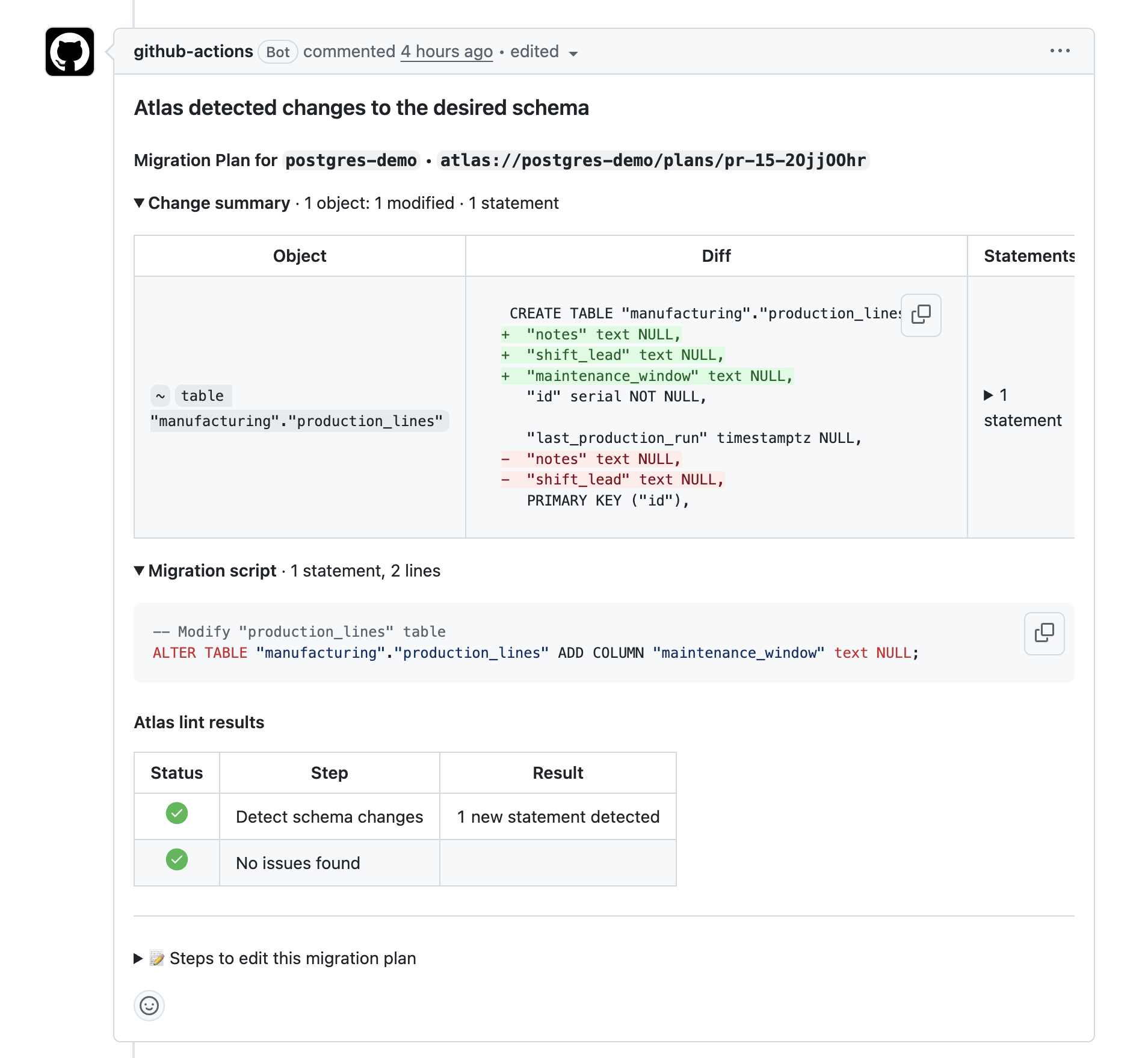
-
Merge it.
approve-pushapproves the plan and pushes the schema, tagged with the merge commit. Thedeployjob runs the approved plan, and its log showsApplying approved migration using pre-planned file pr-<number>-<hash>. The database and the registry now hold the same version.
Then test ad-hoc approval:
- Change the database by hand, outside the pipeline, with any SQL client:
- PostgreSQL (Schema Scope)
- PostgreSQL (Database Scope)
- MySQL
- SQL Server
- ClickHouse
- Snowflake
- Other
ALTER TABLE users ADD COLUMN created_at timestamptz;
With psql, leave search_path out of the URL, because psql rejects that parameter:
psql "postgres://<user>:<pass>@<host>:5432/<db>?sslmode=require" \
  -c 'ALTER TABLE users ADD COLUMN created_at timestamptz'
ALTER TABLE "public"."users" ADD COLUMN created_at timestamptz;
ALTER TABLE users ADD COLUMN created_at timestamp NULL;
ALTER TABLE users ADD created_at datetime2 NULL;
ALTER TABLE users ADD COLUMN created_at DateTime;
ALTER TABLE users ADD COLUMN created_at TIMESTAMP_NTZ;
Add a nullable created_at column to the users table.
-
Run the Atlas workflow on
master(Actions → Atlas → Run workflow). The deployment wants to drop the column. That change has a lint error (DS103), and no plan was approved for it, so the firstschema/applycreates an ad-hoc plan and fails with:Error: cannot apply a migration plan in a PENDING state. Approve the plan first to proceed:
atlas schema plan approve --url atlas://app/plans/commit-1a2b3c4d-5e6f7a8bschema/applywrites the plan, its SQL, and its lint results to the job summary: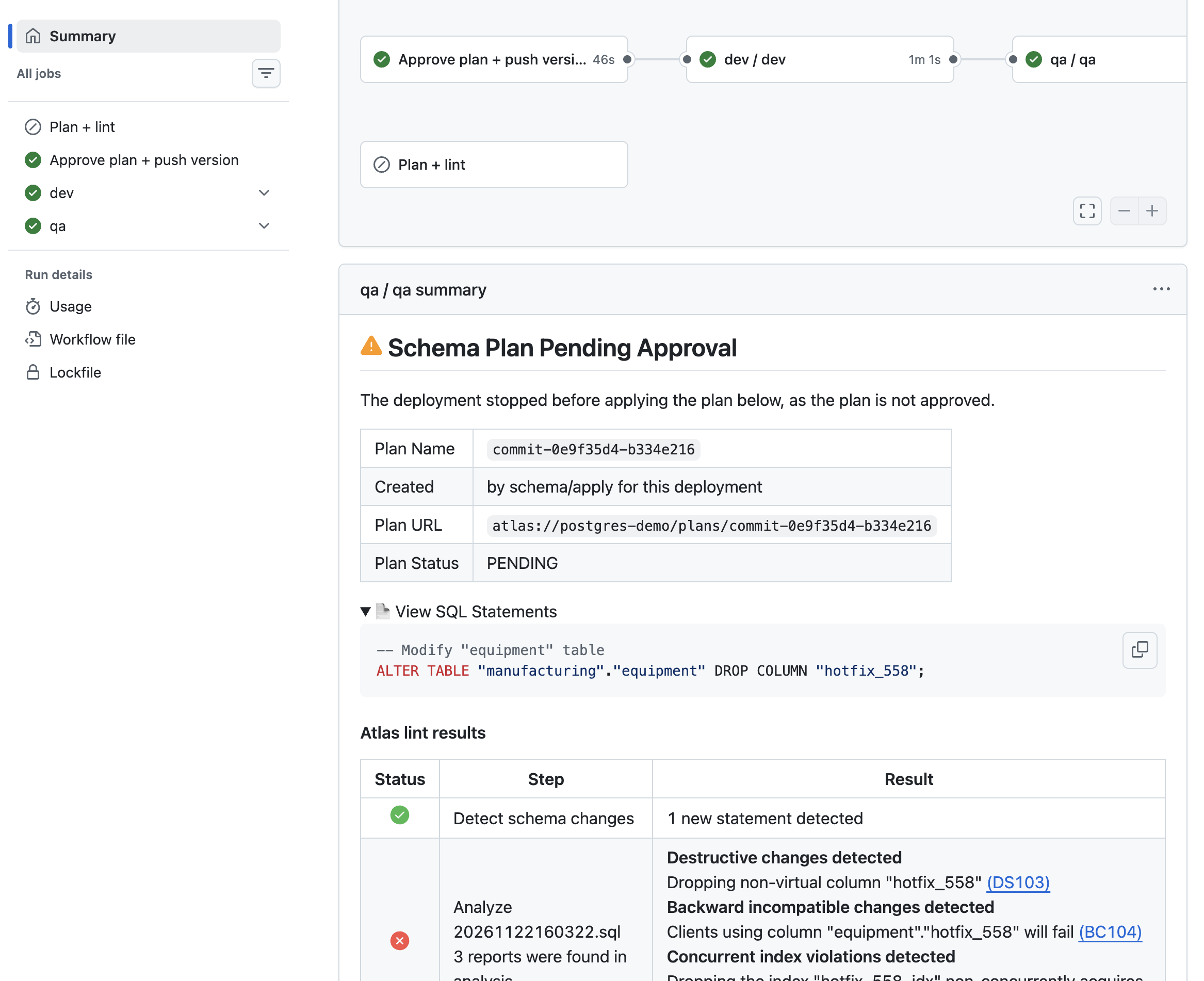
The next step adds the approval link, and the job then waits. GitHub shows the job summary only when the job ends, so while it waits, copy the plan URL from this error or from the log of the Ad-hoc plan waiting for approval step.
-
Run Approve schema plan with
plan: atlas://app/plans/commit-1a2b3c4d-5e6f7a8b. Its summary shows the approved plan and who approved it: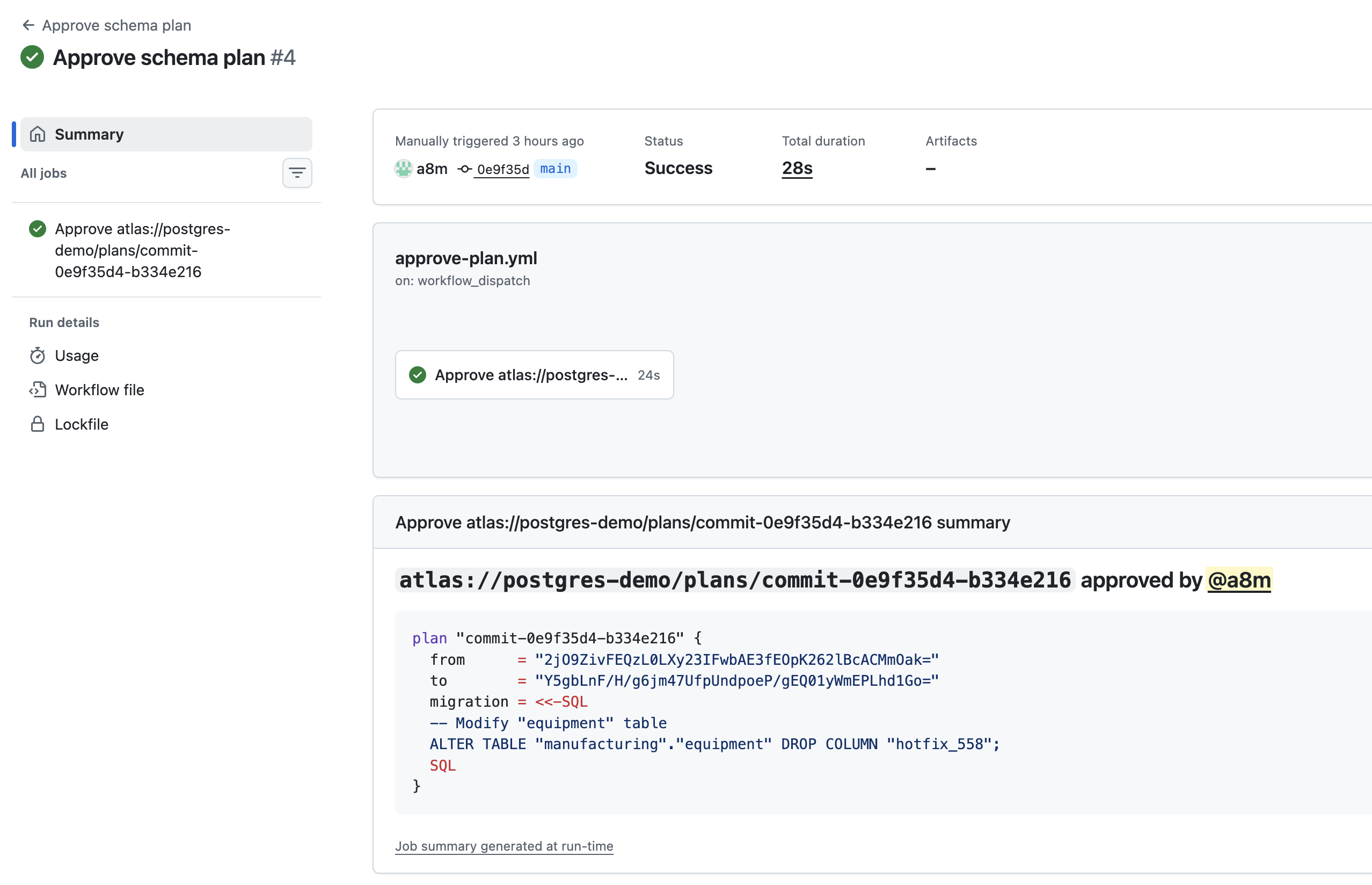
At its next check (every
wait-interval), the waiting step sees the approval and applies the plan:
- PostgreSQL (Schema Scope)
- PostgreSQL (Database Scope)
- MySQL
- SQL Server
- ClickHouse
- Snowflake
- Other
ALTER TABLE "users" DROP COLUMN "created_at";
ALTER TABLE "public"."users" DROP COLUMN "created_at";
ALTER TABLE `users` DROP COLUMN `created_at`;
ALTER TABLE [users] DROP COLUMN [created_at]
ALTER TABLE `users` DROP COLUMN `created_at`;
The plan drops the created_at column.
The plan drops the created_at column.
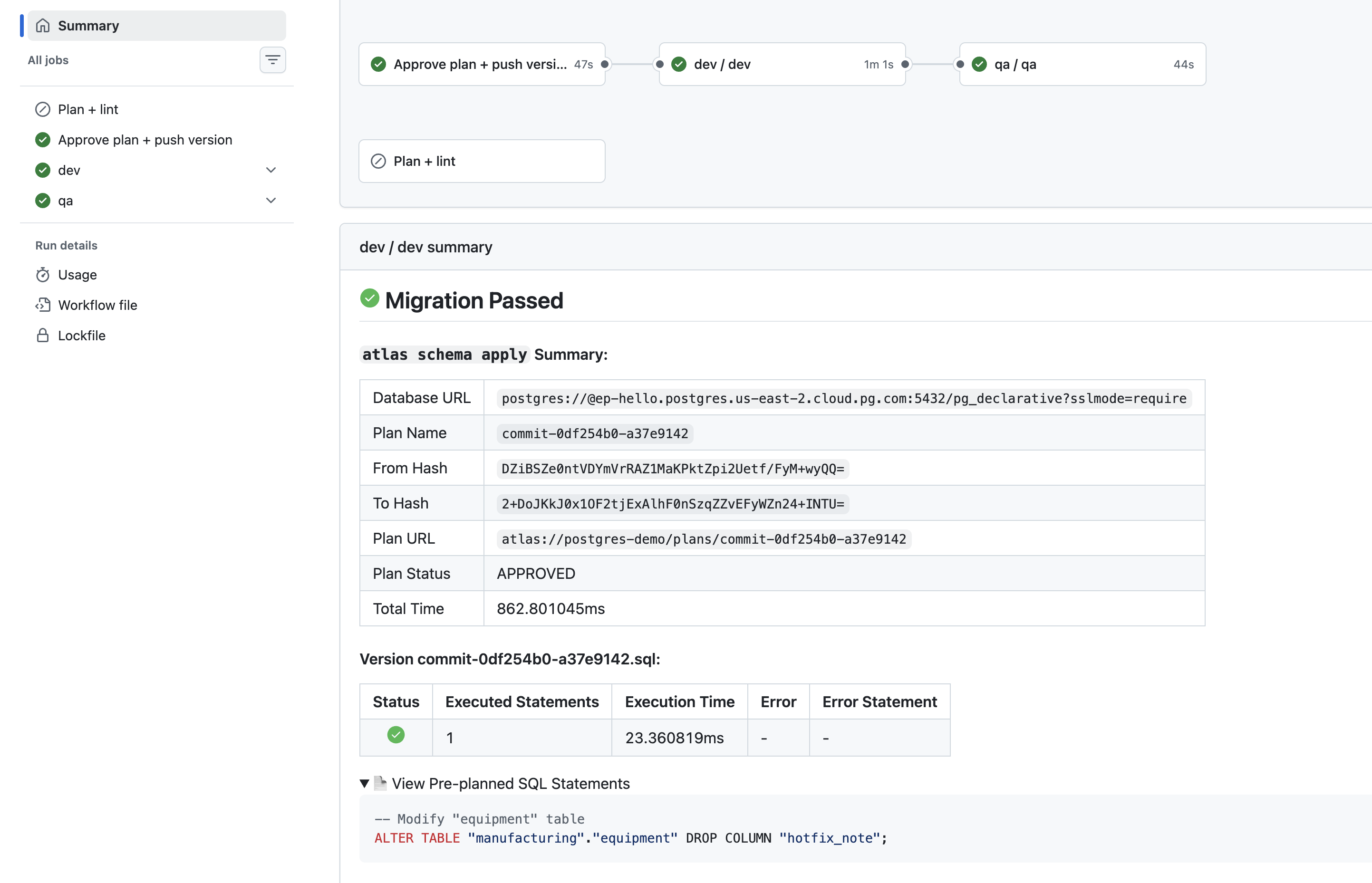
When the job ends, its summary also shows the applied plan:
To keep the column instead, add the same column to schema.sql in a pull request. Its plan has
nothing to change, and after the merge the deployment has nothing to apply. The deployment that was
waiting times out, and its ad-hoc plan stays PENDING. Remove it with
atlas schema plan rm --env prod --url atlas://app/plans/<name>.
Things to Know
-
If no one approves the plan within
wait-timeout, the job fails withthe schema plan "<name>" was not approved within the specified waiting period, and the plan stays pending in GHCR. Approve it, then re-run the failed job, which applies the approved plan. -
To read the registry from your machine, use a classic personal access token with
read:packages. GHCR doesn't accept fine-grained personal access tokens. Listing the plans of a deployment reads the database, so setDATABASE_URLto the read-only URL:export ATLAS_REGISTRY_URL="oci://<user>:<classic-token>@ghcr.io/<owner>/<repo>-schema"
export DATABASE_URL="<read-only database URL>"
atlas schema plan list --env prod --to "atlas://app?tag=<commit>" --pending
atlas schema plan pull --env registry --url "atlas://app/plans/<name>"
Conclusion
The schema repository's versions, tags, and plans now live in GHCR, and the whole declarative flow runs in GitHub. Pull requests plan each change, and merging approves the plan. Deployments run the approved plans. A change that reaches the database without one, and fails lint, waits until a person approves its ad-hoc plan with a workflow run.
Next Steps
With a coding agent, install the Atlas agent skills. One command installs them:
- Claude Code
- OpenAI Codex
- Cursor
- GitHub Copilot
Install the skills from a terminal. It installs the Atlas plugin, with all its skills, for every project on this machine.
claude plugin marketplace add ariga/atlas
claude plugin install atlas@ariga
Then start the onboarding skill in Claude Code. See Claude Code with Atlas for the other ways to use the skills.
/atlas:atlas-onboard
Install the skills from a terminal. Run it from the repository root. It installs every Atlas skill in .agents/skills/.
npx skills add ariga/atlas -a codex -y
Then start the onboarding skill in OpenAI Codex. See OpenAI Codex with Atlas for the other ways to use the skills.
$atlas-onboard
Install the skills from a terminal. Run it from the repository root. It installs every Atlas skill in .agents/skills/.
npx skills add ariga/atlas -a cursor -y
Then start the onboarding skill in Cursor. See Cursor with Atlas for the other ways to use the skills.
/atlas-onboard
Install the skills from a terminal. Run it from the repository root. It installs every Atlas skill in .agents/skills/.
npx skills add ariga/atlas -a github-copilot -y
Then start the onboarding skill in GitHub Copilot. See GitHub Copilot with Atlas for the other ways to use the skills.
/atlas-onboard
The atlas-action skill covers workflows that run Atlas,
including a schema registry in GHCR, and the agent loads it when it writes or fixes one. To set up
Atlas in a new project, start the atlas-onboard
skill.