Declarative Schema Migrations with the Atlas Kubernetes Operator
Intro
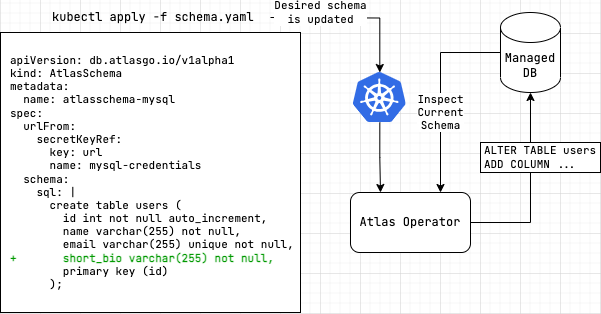
The Atlas Kubernetes Operator supports declarative migrations.
In declarative schema migrations, the desired state of the database is defined by the user and the operator is responsible
for reconciling the desired state with the actual state of the database (planning and executing CREATE, ALTER
and DROP statements).
In this workflow, after installing the Atlas Kubernetes Operator, the user defines the desired state of the database
as an AtlasSchema resource which either includes the desired schema one of various ways described below.
The operator then reconciles the desired state with the actual state of the database by planning and executing
CREATE, ALTER and DROP statements.
This Document
This document describes the declarative workflow supported by the Atlas Kubernetes Operator. It covers the following topics:
- Providing Schemas: How to provide the desired schema to the Atlas Kubernetes Operator.
- Providing Credentials: Different ways to provide the URL of the target database to the Atlas Kubernetes Operator.
- Safety Mechanisms: Ways to control the operator's behavior and prevent unwanted outcomes.
- API Reference: A reference guide to the
AtlasSchemaresource.
Providing the schema
The declarative workflow requires the user to define the desired state of the database as an AtlasSchema resource.
In this section we review the different ways to provide the schema to the Atlas Kubernetes Operator.
A word of caution: if you have multiple AtlasSchema resources that target the same database, you should
ensure that the schemas defined in each resource do not overlap. Otherwise, the operator may produce
unexpected results when attempting to reconcile the state of the database.
From Schema Registry
The recommended way of providing the schema to the AtlasSchema resource is by referencing a schema stored in the
Atlas Schema Registry:
apiVersion: db.atlasgo.io/v1alpha1
kind: AtlasSchema
metadata:
  name: schema-from-registry
spec:
  url: '<database URL>'
  schema:
    url: atlas://declarative-flow?tag=7e0d7c798a15c1d3788dc515b87925f7bb00d217
  cloud:
    tokenFrom:
      secretKeyRef:
        name: atlas-token
        key: ATLAS_TOKEN
This is akin to specifying a tagged container image in a Kubernetes Deployment resource.
This approach has multiple benefits:
- Schema sizes are not limited by the Kubernetes API server's size constraints.
- Schemas are produced by a CI/CD pipeline and treated as a build artifact, ensuring only validated schemas are applied.
- The schema is versioned and can be rolled back to a previous version if necessary.
- Schemas can be composed of multiple types of sources (e.g. SQL files, ORM models, etc.).
The Schema Registry is a hosted service provided by Atlas that stores and serves schemas to the Atlas Kubernetes Operator.
To facilitate access to the registry, the API token is stored in a Kubernetes secret and referenced in the AtlasSchema resource.
To keep the cached Atlas Cloud grant across operator pod restarts, enable Helm persistence on the operator deployment.
Inline
Alternatively, the schema can be provided inline in the AtlasSchema resource. The schema may be provided
as a SQL document:
apiVersion: db.atlasgo.io/v1alpha1
kind: AtlasSchema
metadata:
  name: atlasschema-pg
spec:
  url: '<database URL>'
  schema:
    sql: |
      create table t1 (
        id int
      );
Schemas may also be provided as an Atlas HCL document:
apiVersion: db.atlasgo.io/v1alpha1
kind: AtlasSchema
metadata:
  name: atlasschema-pg
spec:
  url: '<database URL>'
  schema:
    hcl: |
      schema "public" {
      }

      table "t1" {
        schema = schema.public
        column "id" {
          type = "int"
        }
      }
From a Kubernetes ConfigMap
The schema can also be provided from a Kubernetes ConfigMap:
kind: ConfigMap
apiVersion: v1
metadata:
  name: mysql-schema
data:
  schema.sql: |
    create table users (
       id int not null auto_increment,
       name varchar(255) not null,
       email varchar(255) unique not null,
       short_bio varchar(255) not null,
       primary key (id)
    );
This ConfigMap is then referenced from withing the AtlasSchema resource:
apiVersion: db.atlasgo.io/v1alpha1
kind: AtlasSchema
metadata:
  name: configmap-schema
spec:
  schema:
    configMapKeyRef:
      key: schema.sql
      name: mysql-schema
Providing credentials
URLs
In order to manage the schema of your database, you must provide the Atlas Kubernetes Operator with an Atlas URL to your database. The Atlas Kubernetes Operator will use this URL to connect to your database and apply changes to the schema. As this string usually contains sensitive information, we recommend storing it as a Kubernetes secret.
Both AtlasSchema and AtlasMigration resources support defining the connection URL as a string (using the url field)
or as a reference to a Kubernetes secret (using the urlFrom field):
If you are connecting to a database that is running in your Kubernetes cluster, note that you should
you use a namespace-qualified DNS name to connect to it. Connections are made from the Atlas Kubernetes Operator's
namespace, so you should use a DNS name that is resolvable from that namespace. For example, to connect to the mysql
service in the app namespace use:
mysql://user:pass@mysql.app:3306/myapp
Schema and database bound URLs
Notice that depending on your use-case, you may want to use either a schema-bound or a database-bound connection.
- Schema-bound connections are recommended for most use-cases, as they allow you to manage the schema of a database
schema (named database). This is akin to selecting a specific database using a
USEstatement. - Database-bound connections are recommended for use-cases where you want to manage multiple schemas in a single database at once.
Create a file named db-credentials.yaml with the following contents:
- MySQL (Schema-bound)
- MySQL (DB-bound)
- PostgreSQL (Schema-bound)
- PostgreSQL (DB-bound)
apiVersion: v1
kind: Secret
metadata:
name: mysql-credentials
type: Opaque
stringData:
  url: "mysql://user:pass@your.db.dns.default:3306/myapp"
This defines a schema-bound connection to a named database called myapp.
apiVersion: v1
kind: Secret
metadata:
name: mysql-credentials
type: Opaque
stringData:
  url: "mysql://user:pass@your.db.com:3306/"
This defines a database-bound connection.
apiVersion: v1
kind: Secret
metadata:
name: pg-credentials
type: Opaque
stringData:
  url: "postgres://user:pass@your.db.com:5432/?search_path=myapp&sslmode=disable"
This defines a schema-bound connection to a schema called myapp to the default database (usually postgres).
apiVersion: v1
kind: Secret
metadata:
name: pg-credentials
type: Opaque
stringData:
  url: "postgres://user:pass@your.db.com:5432/?sslmode=disable"
Your URL scope must match the scope of your schema definitions. If your schemas use qualified statements
(e.g., CREATE FUNCTION myschema.myfunc()) or operate across multiple schemas, use a database-bound URL.
For example, if the URL includes search_path (PostgreSQL) or a schema name (MySQL), Atlas limits its scope to that single schema.
A mismatch can cause errors such as "already exists" or unexpected behavior when applying or reverting changes.
For more details, see Schema vs. Database scope.
For examples of URLs for connecting to other supported databases see the URL docs
urlFrom
The urlFrom field is used to load the URL of the target database from another resource such as a
Kubernetes secret.
urlFrom:
    secretKeyRef:
      key: url
      name: mysql-credentials
url
The url field is used to define the URL of the target database directly. This is not recommended, but may
be useful for testing purposes.
url: "mysql://user:pass@localhost:3306/myapp"
credentials object
Alternatively, you can provide the credentials for your database as a credentials object.
apiVersion: db.atlasgo.io/v1alpha1
kind: AtlasSchema
metadata:
  name: atlasschema-postgres
spec:
  credentials:
    scheme: postgres
    host: postgres.default
    user: root
    passwordFrom:
      secretKeyRef:
        key: password
        name: postgres-credentials
    database: postgres
    port: 5432
    parameters:
      sslmode: disable
  # ... rest of the resource
Note: hostFrom and userFrom are also supported to load the host and user from another resource.
When using the config or configFrom fields with an env block that defines the database url
(for example, when using aws_rds_token for IAM authentication),
the credentials, url, and urlFrom fields in the resource spec are ignored.
See Using Custom Project Configuration for examples of using IAM authentication and other advanced configurations.
Safety
To control the operator's behavior and prevent unwanted outcomes a user may define policies of the following types:
| Policy Type | Purpose | Field |
|---|---|---|
| Lint Policies | Analyze the planned changes and emit diagnostics about potential issues. The user controls in which cases the Operator should not proceed with the changes. | policy.lint |
| Diff Policies | Govern the way the Operator calculates the difference between the desired and actual state of the database, specifying rules for ignoring certain changes or for applying changes in a specific way. | policy.diff |
| Review Policies | Define the conditions under which the Operator should pause and wait for manual approval before proceeding with the changes. | policy.lint.review |
API Reference
Example AtlasSchema resource
apiVersion: db.atlasgo.io/v1alpha1
kind: AtlasSchema
metadata:
  name: myapp
spec:
  # Load the Atlas API token from a Kubernetes secret.
  cloud:
    tokenFrom:
      secretKeyRef:
        name: atlas-token
        key: ATLAS_TOKEN
  # Load the URL of the target database from a Kubernetes secret.
  urlFrom:
    secretKeyRef:
      key: url
      name: mysql-credentials
  # Define the desired schema of the target database. This can be defined in either
  # plain SQL, in Atlas HCL or by referencing a schema version in the Schema Registry.
  schema:
    url: atlas://declarative-flow?tag=7e0d7c798a15c1d3788dc515b87925f7bb00d217 # The URL of the schema in the Schema Registry.
  # Define policies that control how the operator will apply changes to the target database.
  policy:
    # Define a policy that will stop the reconciliation loop if the operator detects
    # a destructive change such as dropping a column or table.
    lint:
      destructive:
        error: true
    # Define a policy that omits DROP COLUMN changes from any produced plan.
    diff:
      skip:
        drop_column: true
  # Exclude a table from being managed by the operator. This is useful for resources
  # that belong to other applications and are managed in other ways.
  exclude:
    - external_table_managed_elsewhere
url / urlFrom
See the Credentials section for more information on how to provide the URL of the target database.
devURL
Atlas relies on a dev-database to normalize schemas and make various
calculations. By default, the operator will spin a new database pod to use as the dev-database.
However, if you have special requirements (such as have it preloaded with certain extensions or configuration),
you can use the devURL field to specify a URL to use as the dev-database.
devURL: mysql://root:password@dev-db-svc.default:3306/dev
devURLFrom
Alternatively, you can use the devURLFrom field to specify a key in a Secret that contains the dev-database URL.
devURLFrom:
  secretKeyRef:
    key: dev-url
    name: myapp
devDB
If you want to use a custom dev-database, you can specify the devDB field. The value of the spec field
is a Kubernetes PodSpec specification that will be used to create the dev-database pod.
Note that if a custom dev-database spec is provided, the devURL field is required as well.
The "hostname" part of the devURL value can be any valid name, such as localhost. The operator will
replace the hostname with the actual pod IP address after it is deployed, so the provided value does not matter.
  devURL: mysql://root:pass@localhost:3306/dev
  devDB:
    spec:
      containers:
        - name: mysql-dev
          image: mysql:latest
          env:
            - name: MYSQL_ROOT_PASSWORD
              value: pass
            - name: MYSQL_DATABASE
              value: dev
          ports:
            - containerPort: 3306
              name: mysql
          startupProbe:
            exec:
              command: [ "mysql", "-ppass", "-h", "127.0.0.1", "-e", "SELECT 1" ]
            failureThreshold: 30
            periodSeconds: 10
envName
Controls the environment name reported to Atlas Cloud for deployment runs. Available only when using a remote
type directory. Defaults to kubernetes.
envName: prod
config / configFrom
The config field is a string that contains the configuration in HCL format.
The configFrom field is a reference to a secret that contains the configuration in HCL format.
Using custom configuration enables advanced features like data sources
(e.g., aws_rds_token for IAM authentication),
composite_schema, and more.
For complete examples, see Using Custom Project Configuration.
Using unnamed env blocks with name = atlas.env
When using the config field, you can define an unnamed env block that dynamically takes its name from the
envName field in the resource spec. This is useful when reusing the same configuration across multiple
environments:
spec:
  envName: "prod"  # This value is passed to `atlas.env`
  config: |
    env {
      name = atlas.env  # Resolves to "prod" at runtime
      url  = "postgres://..."
    }
This is equivalent to defining env "prod" { ... } but allows the environment name to be set dynamically.
When the config block defines the database url inside an env block, the credentials, url, and urlFrom
fields in the resource spec are ignored. Use one approach or the other, not both.
vars
You can use vars in the configuration to make it more dynamic.
- Key-Pair
- Secret
- ConfigMap
spec:
  envName: "prod"
  vars:
    - key: "url"
      value: "postgres://user:password@localhost:5432/db"
  config: |
    variable "url" {
      type = string
    }
    env "prod" {
      url = var.url
    }
spec:
  envName: "prod"
  vars:
    - key: "url"
      valueFrom:
        secretKeyRef:
          name: secret-creds
          key: url
  config: |
    variable "url" {
      type = string
    }
    env "prod" {
      url = var.url
    }
spec:
  envName: "prod"
  vars:
    - key: "url"
      valueFrom:
        configMapKeyRef:
          name: configmap-creds
          key: url
  config: |
    variable "url" {
      type = string
    }
    env "prod" {
      url = var.url
    }
schema
Provides the desired schema of the target database.
schema.sql
Provides the desired schema as a SQL document.
  schema:
    sql: |
      create table t1 (
        id int
      );
To access the schema from custom configuration you can use the url file://schema.sql.
schema.hcl
Provides the desired schema as an Atlas HCL document.
  schema:
    hcl: |
      schema "public" {
      }

      table "t1" {
        schema = schema.public
        column "id" {
          type = "int"
        }
      }
To access the schema from custom configuration you can use the url file://schema.hcl.
schema.url
References a schema version in the Schema Registry.
  schema:
    url: atlas://declarative-flow?tag=7e0d7c798a15c1d3788dc515b87925f7bb00d217
schema.configMapKeyRef
References a schema provided in a Kubernetes ConfigMap.
  schema:
    configMapKeyRef:
      key: schema.sql
      name: mysql-schema
policy
The policy field is used to define policies that control how the operator will apply changes to the target database.
lint
The lint field is used to define policies that control how the operator will lint the desired schema.
policy:
  lint:
    destructive:
      error: true
Currently, the only lint policy available is destructive. This policy controls what the operator will do if it
detects a destructive change such as dropping a column or table.
lint.review
The lint.review field is used to define in which cases the operator should pause and wait for manual approval
before proceeding with the changes.
policy:
  lint:
    review: WARNING # or ERROR
When lint.review is set, the Operator will analyze the planned changes and emit diagnostics about potential issues.
Depending on the value of lint.review, the Operator will either pause and wait for manual approval before proceeding
with the changes or proceed with the changes regardless of the diagnostics.
The following options are available:
ERROR: The Operator will pause and wait for manual approval only when it detects errors (severe issues).WARNING: The Operator will pause and wait for manual approval when it detects errors or warnings (less severe issues).ALWAYS: The Operator will always pause and wait for manual approval before proceeding with the changes.
Note: lint.review may only be set for Atlas Pro users and thus requires a valid Atlas API token. Without a cloud
block, the Operator has nowhere to publish the plan and stops with
auto-approve is not allowed when a lint policy is set to "ERROR".
diff
The diff field is used to define the diff policies that are used to plan the schema changes.
policy:
  diff:
   skip:
    drop_column: true
Currently, the only diff policy available is skip. This policy controls which kind of schema changes will be
skipped from the produced plan. The following options are available:
add_column,add_foreign_key,add_index,add_schema,add_table,drop_column,drop_foreign_key,drop_index,drop_schema,drop_table,modify_column,modify_foreign_key,modify_index,modify_schema,modify_table
exclude
The exclude field is used to define tables that should be excluded from being managed by the operator.
This is useful for resources that belong to other applications and are managed in other ways.
exclude:
- external_table_managed_elsewhere
schemas
The schemas field is used to define schemas that should be managed by the operator. This is used
to manage multiple schemas in a single database and works only if the connection string is database-bound.
schemas:
- schema1
- schema2
- Secret
- Inline
spec:
  envName: "prod"
  configFrom:
    secretKeyRef:
      key: config
      name: my-secret
spec:
  envName: "prod"
  config: |
    env "prod" {
      ...
    }
backoffLimit
The backoffLimit field is used to define the number of retries the operator will attempt
if a reconciliation fails. default is 20.
backoffLimit: 5